Add your own campaign to the Retold menu
By Aainiikkusu · retold
A scenario-author reference for campaign XML, scenario nodes, menu presentation and mission dependencies.
1. Getting Started
This guide will teach you how to add your very own campaign to the Custom Campaign menu. There might be other-better ways to go around doing it, but this is the way that I know.
First, we will create a local mod inside which we will put all our campaign files. Go to the local files folder for the game. For me the location is C:\Users\xxxx\Games\Age of Mythology Retold\76561198089807598. Your location might be a bit different.
 Inside that folder, add a folder 'game' and inside another folder 'campaign'.
Inside the 'campaign' folder, add the files that constitute your campaign. They should be files ending in '.mythscn'.
Once this is done, create another file with the name of your campaign, ending in '.xml'. This will be your campaign file.
2. The campaign file
Inside the campaign file (.xml) add the following content. We will edit it after.
STR_AC_MENU_CAMPAIGN
STR_AC_MENU_CAMPAIGN_DESC
/resources/aainiikusuchallenges_foil.png
ui/campaign_map/map_fott
/resources/campaign/fott/compendium_card_fott.png
ac
ac\anx1
STR_AC_MENU_TITLE_01
STR_AC_MENU_PREMISE_01
resources\campaign\fott\screen1.png
resources\campaign\fott\screen1.png
ui\campaign_map\pins\anx1_mappin
ui/campaign_map/map_fott
0.40
0.49
1.0
We should edit the contents of the tags. Let's look at the first few ones.
| DisplayNameStringID |
The name of your campaign. |
| RolloverStringID |
The description of your campaign. From my understanding, custom campaigns do not display this. |
| MotifImage |
Image of the campaign in the menu. From my understanding, custom campaigns do not display this. |
| MapImage |
The map background of the campaign when you view the scenario list. |
| CompendiumImage |
??? |
| CompendiumTopic |
ID of your campaign, make sure it is unique (?) |
Then, for each of your scenarios, copy a and its contents and edit it.
| Filename |
Filepath to your scenario, starting from the 'campaign' folder. Do not add '.mythscn' at the end. |
| DisplayNameStringID |
Name of your scenario. |
| RolloverStringID |
Description of your scenario. |
| BackgroundImage |
??? |
| LoadImage |
Image of your scenario during loading screen. |
| PinImage |
The icon of your scenario. |
| MapImageOverride |
Overrides the MapImage just for this scenario (e.g. a singular scenario in Scandinavia in a otherwise Greek campaign.) |
| Cinematic |
Whether it's a cinematic or not, 1 = true, 0 = false. (typically used with Visible below) |
| Visible |
Whether it's selectable in the menu or not, 1 = true, 0 = false. |
| PrereqScenarioFile |
A scenario to complete before making this scenario visible. |
If you're ever lost or need more examples, you can always refer to the campaigns from the game. The campaign files (.xml) are located here : C:\Program Files (x86)\Steam\steamapps\common\Age of Mythology Retold\game\campaign (your path may also be different)
Conclusion
With all the files in place and properly configured, you should see your campaign appear in-game.
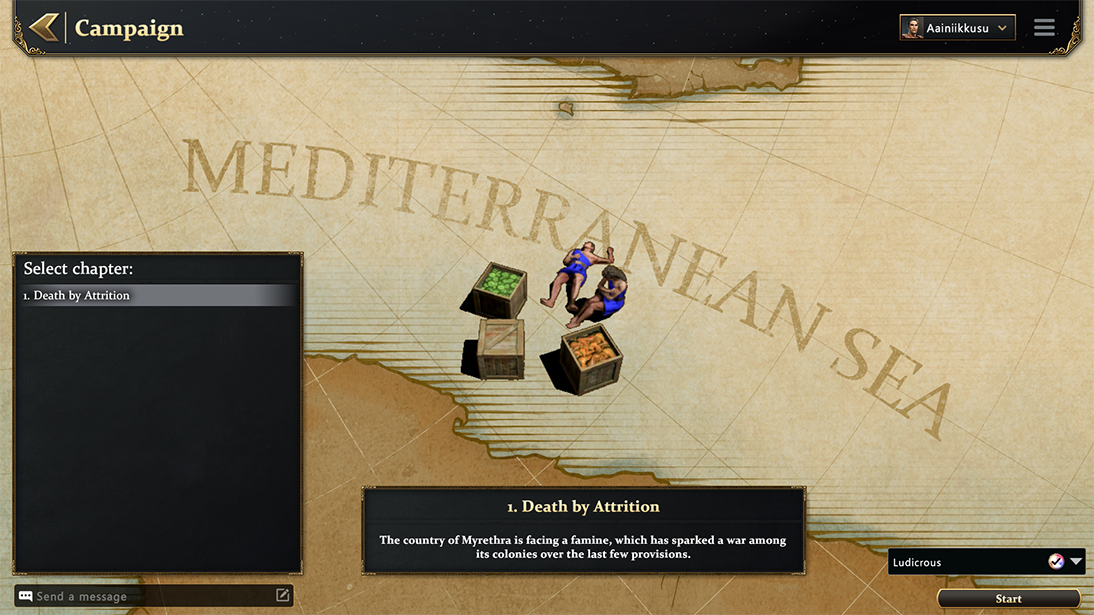
If you have any questions, feel free to comment or send a DM.
Source: Aainiikkusu · Steam Community guide “Add a custom campaign to the menu”